Learn it in one hold
There's only one input: hold to fly, release to glide. Anyone can join a company Christmas party or a five-minute work break without reading instructions.
Strap on the jetpack, dodge toy soldiers and snowmen, and see who tops the leaderboard. It's a browser-based Christmas game you can brand and drop into any company party, holiday email or internal campaign.
A quick look at Santa's Gift Run in action.
It's Christmas Eve and Santa's running late, so he's strapped on a jetpack. Santa's Gift Run is an endless flying game: hold to climb, let go to glide, and sweep up wrapped gifts drifting across the night sky over the rooftops.
There's no level to finish and no health bar. One touch from a toy soldier or a snowman ends the run, and Santa's jetpack has its own energy bar that drains as he flies — every second is a small decision: chase the next gift, or peel off for an energy orb.
It's an easy drop-in for a company Christmas party, an employee engagement campaign or a client-facing holiday email — a corporate Christmas game that runs right in the browser, with no app and no install.
It's built on the same push-your-luck mechanics that make endless flyers addictive, tuned for a Christmas theme.
There's only one input: hold to fly, release to glide. Anyone can join a company Christmas party or a five-minute work break without reading instructions.
Santa's energy drains in about 24 seconds without a top-up, and green energy orbs only appear every 7 to 10 seconds. Players are always making a small call: chase the gift trail, or peel off for energy.
Fly into the candy-cane rocket and Santa boosts forward at almost double speed for 4 seconds, with no new enemies spawning — just a pure run of gifts for players who timed it right.
Every run ends with a gift count and a spot on a ranked leaderboard, where tied scores share a rank. It's a natural way to get colleagues comparing scores over the holidays.
Hold the left mouse button, Space or the Up arrow on a computer, or just touch and hold on a phone or tablet. Let go and Santa glides back down.
Fly through the trails of wrapped gifts and steer around the toy soldiers and snowmen. Grab a green energy orb before the bar runs low — it flashes red and beeps under 30.
Fly into a candy-cane rocket for a 4-second speed boost, then save your name and score to the leaderboard when the run ends.
Santa's Gift Run can be re-themed and re-branded for your company before it ever reaches a player.
Add your logo to the loading screen, main menu and the result card players see after every run.
Trade the wrapped gifts for your product icon, a company mascot, or a branded token — the gift-collecting mechanic stays the same.
Recolor the jetpack flame, the energy bar, the boost glow and the gift trail to your palette instead of the default Christmas theme.
Tell us what you'd like to change and we'll send a proof before anything goes live.
Get a quoteOne input — hold to fly, release to glide (mouse, Space, Up arrow, or touch on mobile).
Wrapped gifts (+1 score each), green energy orbs, and candy-cane boosters.
Toy soldiers, which patrol up and down in a steady rhythm, and snowmen, which float on clouds or stand on rooftops.
None — touching any enemy ends the run instantly. There's no health or combat.
Drains in about 24 seconds from full. Each orb restores 35 energy, and a new orb appears every 7 to 10 seconds.
Ramps over the first two minutes — two-enemy "gates" appear around 25 seconds in, and three-soldier "gauntlets" around 55 seconds in.
+1 per gift collected. The board ranks scores highest first, and tied scores share a rank.
Christmas music and sleigh bells throughout, plus effects for the jetpack, gifts, energy, boosts and crashes. Toggle it anytime from the main menu or the speaker icon.
A quick, competitive game people can jump into between courses or during a lull, with a leaderboard that keeps the whole room checking back.
Drop the link into an internal newsletter or intranet post and let departments compete for the top of the leaderboard over the holidays.
Send it in a holiday email or landing page as a quick distraction that's more memorable than a static Christmas card.
See it in action, right here.
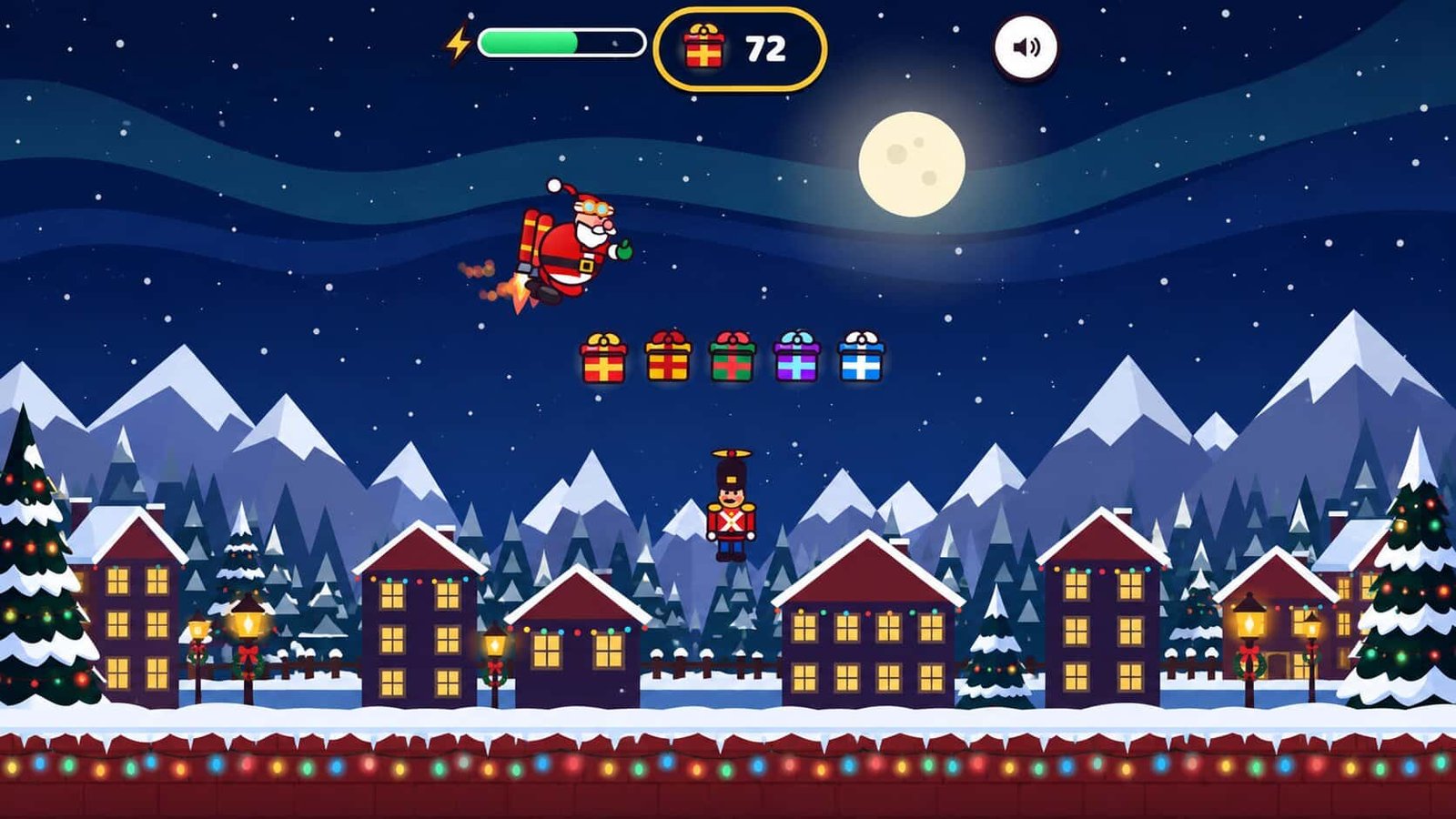
Trouble playing? Open Santa's Gift Run in a new tab.
Trivia, memory match and spin games players open by QR code — no app required.
See digital gamesA spin-to-win wheel with your logo at the hub, built for busy trade show aisles.
See prize wheelsRing toss, cornhole and putting challenges that turn visitors into competitors.
See skill gamesNo. Santa's Gift Run runs right in the browser at the game link, so anyone can join from a laptop or phone with no app or install.
A run ends the moment Santa touches an enemy or his energy runs out, so most runs last a minute or two — long enough to be fun, short enough to fit into a work break or a party.
Yes. The jetpack flame, energy bar, boost glow and gift trail can all be re-themed to your brand colors, and your logo can sit on the loading screen and result card.
Yes. Players save their name and score at the end of a run, and the board ranks everyone highest first, with tied scores sharing a rank — a built-in leaderboard for a team or company-wide event.
Tell us about your event or campaign and we'll come back with pricing and a branding plan.