Learned in seconds
Players aim and fire. On desktop that's a mouse and a click. On a phone, drag to aim and lift your finger to shoot. A short how-to-play screen covers the rest.
A 60-second Christmas shooting gallery that plays in the browser. Players aim at the ducks, dodge the bombs and chase a high score, with your logo, colors and message built in.
Watch a round of Duck Carnival Shoot. Watch on YouTube
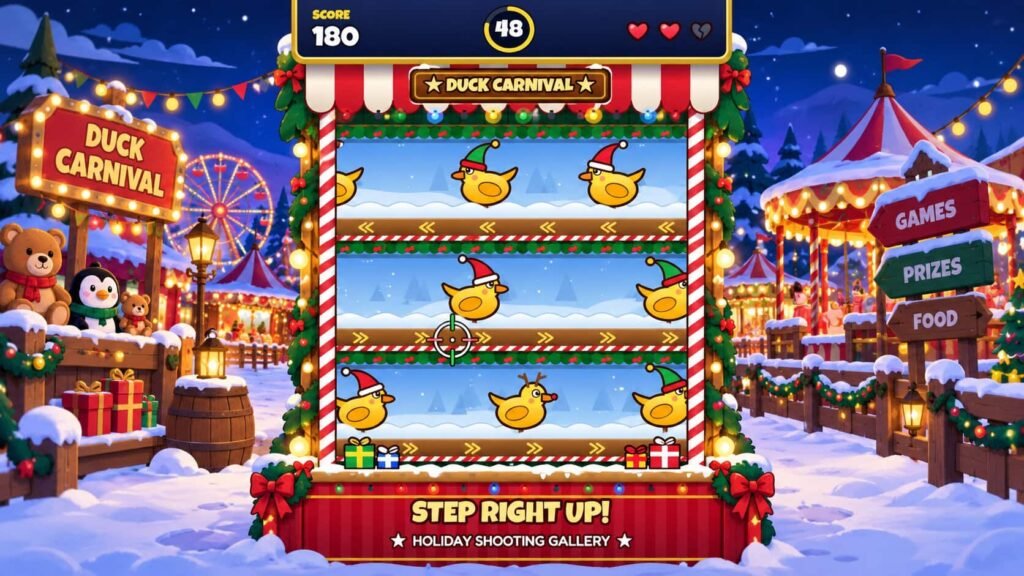
Duck Carnival Shoot is a Christmas shooting gallery that plays in the browser. Ducks in Santa hats, scarves, elf hats and reindeer antlers glide across three lanes of a carnival booth, and players have 60 seconds to shoot as many as they can.
There's a catch. Bombs ride in the same lanes, and shooting one costs a life. Players get three, so a steady aim beats a trigger-happy finger. Lanes also switch direction mid-round, with a flash and a warning sound first, which keeps confident players on their toes.
As a branded shooting game, it carries your logo, colors and message. Visitors can open it from a QR code or a link, and the game saves each player's best score in their own browser, so there's always a reason to go one more round.
Every feature below comes from how the game actually plays, so you know what your visitors will experience.
Players aim and fire. On desktop that's a mouse and a click. On a phone, drag to aim and lift your finger to shoot. A short how-to-play screen covers the rest.
A round lasts 60 seconds at most, and it ends early if a player loses all three lives. A queue at your booth keeps shuffling forward.
Targets speed up in stages and more bombs appear. A sign calls out the final 10 seconds, and at 52 seconds every lane reverses at once.
Five ducks in a row doubles your points, and ten in a row triples them. A miss or a bomb resets the streak, and the game saves each player's best score so they can try to beat it.
Move the mouse, or drag a finger across the screen. The crosshair turns gold over a duck and red over a bomb.
Click, or lift your finger, to fire. Each duck is worth 10 points, and a streak of five doubles them.
Shooting a bomb costs one of your three lives. Keep hitting ducks until the 60 seconds run out.
Want to try it before you ask for a quote? Play a round right here.
Play the gameThe game comes with a Christmas carnival look. Send us your brand and we'll build your version, then share a proof for you to approve before it goes live.
Get a quoteWe place your logo on the canopy sign and the game screens players see most.
Swap the holiday palette for your brand colors, or keep the Christmas look and bring your colors in as accents.
Tell us what you want players to remember, whether that's a product, a mascot or an offer, and we'll work it into the game.
What's in the standard build, taken straight from the game.
The Christmas carnival look suits December promotions, retail events and seasonal pop-ups. Visitors can play on a screen at your space or on their own phones.
A 60-second round keeps a queue moving. Put a QR code on your stand and let visitors play while your team starts the conversation.
Share the link with guests before a holiday party, or run it on a screen at the venue and let people compare best scores.
Try a full 60-second round yourself. Aim at the ducks, steer clear of the bombs and see how a branded shooting game feels in your hands.
Click play to start a round right here. Tap play to open the game in a full window. Trouble playing? Open in a new tab
Running more than one activation, or still comparing formats? These games carry your logo, colors and message too.
A round lasts 60 seconds. It ends sooner if the player loses all three lives by shooting bombs. Short rounds keep a queue moving at a busy booth.
Yes. It plays in the browser, with a portrait layout that fills a phone screen. Players drag a finger to aim and lift it to shoot. On a desktop they aim with the mouse and click to shoot. There's nothing to download.
Yes. Send your logo, colors and message, and we'll share a proof for you to approve. Tell us in your quote request what you'd like to change and we'll confirm what's possible.
The standard build has no sign-up form and no leaderboard. It only saves each player's best score and music setting in their own browser. If your campaign needs lead capture, mention it in your quote request and we'll confirm what we can do.
Tell us about your event, your audience and your budget. We'll come back with games that fit.