Gift Fishing Challenge: a branded Christmas fishing game

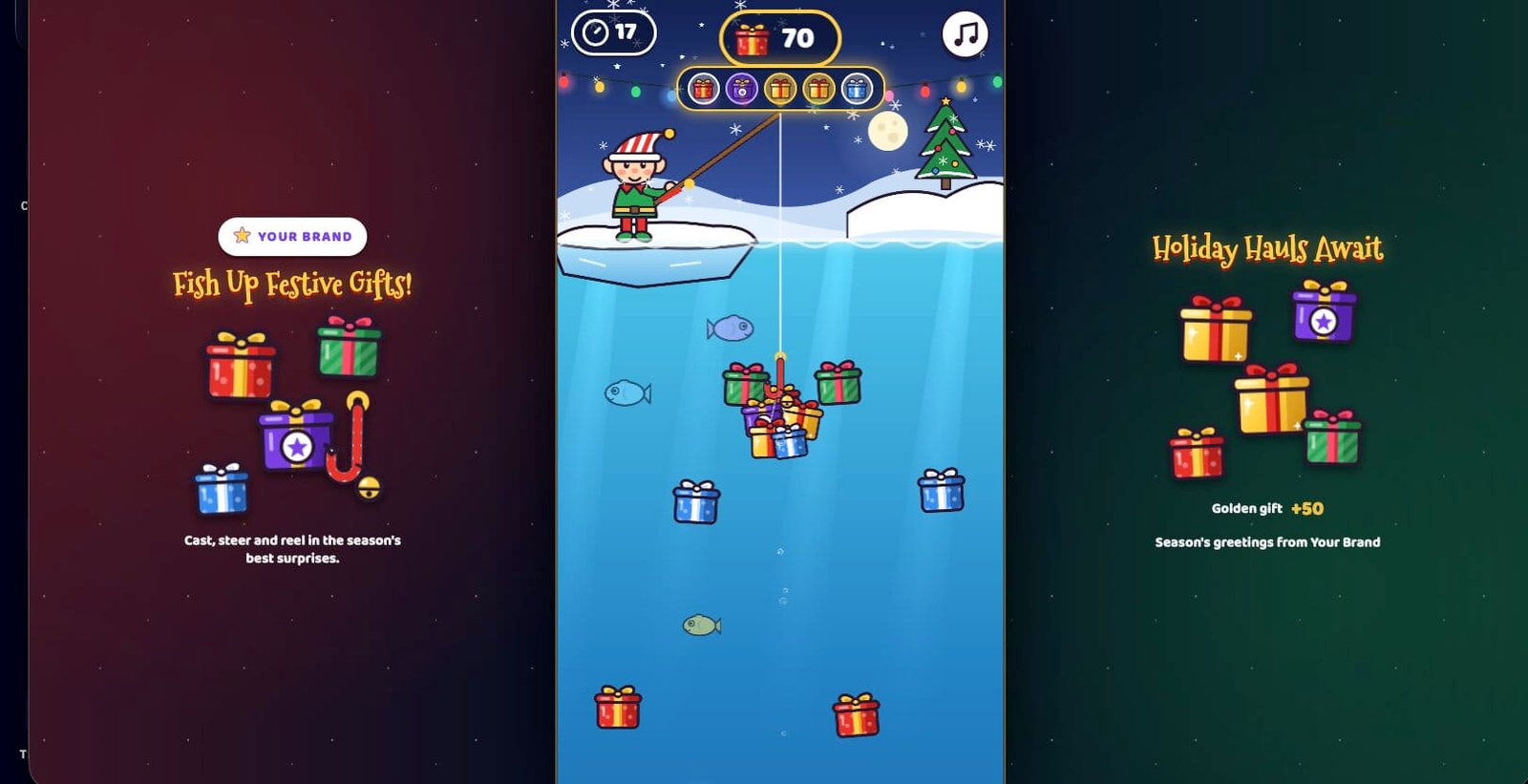
Gift Fishing Challenge is a branded browser game where a festive elf goes ice-fishing for presents. Players tap to cast a candy-cane hook into a winter gift pond, drag to steer it into as many gifts as they can and reel them up, all in one 60-second run.

  • Tap to cast, then drag left or right to steer the hook
  • One 60-second run with no lives and no levels, so the next player steps up fast
  • Plays in a phone or desktop browser, nothing to install

Gameplay clip. It starts muted, so use the video controls for sound.

What is Gift Fishing Challenge?

Gift Fishing Challenge is a 60-second arcade game that runs in the browser. A festive elf is ice-fishing for presents, and the player's job is to cast a candy-cane hook into the winter gift pond and reel up as many gifts as possible. There are no lives and no levels, just one run against the clock.

Every cast is its own small puzzle. A fresh field of gifts is laid out in the pond for each one. The hook sinks to a set depth, marked by a dashed line, then reels back up by itself. The player steers it left and right to touch gifts, which dangle under the hook until it reaches the surface and the points are banked.

The hook holds 5 items. When it's full, it reels up straight away, so a full hook means a shorter cast and more casts. Gifts lean toward the side lanes while the hook drops down the middle, so players have to steer to fill it. Junk like an old boot, coal or a tin can costs 5 points and wastes a slot.

It's built for a portrait phone screen. On a computer, the same portrait game sits in the middle with branded panels on the left and right, which are decoration only.

How points work

  • Gift (red, green or blue)+10
  • Featured gift (purple, star)+30
  • Golden gift (glowing, deep down)+50
  • Perfect Haul: 5 gifts and no junk on one hook+25
  • Junk (old boot, coal, tin can)-5

Points are banked only when the hook reaches the surface. The total score never goes below 0, and every item scores once.

Why a branded fishing game works at events

The controls take a tap and a drag to learn, and every cast asks players to choose where to steer.

Tap to cast, drag to steer

Tap anywhere to cast, then hold and drag left or right and the hook follows your finger. If a player waits, the hook casts by itself after 2.2 seconds, and a four-step tutorial that can be skipped covers the basics.

A full hook changes the plan

The hook holds 5 items and reels up the moment it's full, so players weigh a quick, full hook against a deeper cast. Golden gifts worth +50 only appear in the deepest 45% of a cast, and a Perfect Haul of 5 gifts with no junk adds +25.

The pond changes as the clock runs

Gifts start in generous clusters of 2 to 3, then spread out. From 30 seconds, about 35% of them drift side to side and more featured and golden gifts appear. In the last 15 seconds the hook speeds up, about 40% of gifts drift and junk appears in about 30% of rows.

The last 10 seconds raise the pressure

A 10 SECONDS banner shows, the timer pulses red and the screen edges glow red. A tick sounds every second, higher for the last 3, and the music speeds up.

How to play in three steps

  1. Tap to cast

    Tap anywhere, or click on a computer. The candy-cane hook drops into the pond and sinks to the depth shown by a dashed line.

  2. Drag to steer

    Hold and drag left or right, on the way down and back up. Touch gifts to hook up to 5, and steer around the junk.

  3. Reel in and bank

    The hook reels up by itself. Points are banked when it reaches the surface, and the next cast is ready at once. The run ends after 60 seconds.

Want to see it for yourself? Play the live game.

Play the game

Make it yours: your brand, your message, your difficulty

The game works as it is. Send your logo, brand colors and campaign message, and we'll share a proof for you to approve before anything goes live.

Your brand around the pond

On a computer, the portrait game sits between branded panels on the left and right. Featured gifts are the 30-point purple star gifts, and the result screen has a Brand Fan badge for players who catch 3 or more. Tell us where your brand should show and we'll confirm what's possible.

Your message and form wording

After the run, players see a form for a name, an email and a consent tick. Its wording is placeholder text kept in the game's settings file, so your own consent wording and campaign copy can take its place.

Your difficulty

The run is built from four 15-second phases, each with its own hook speed, cast depth, gift spread, drift and junk. Tell us about your crowd and how long each player should stay at the screen, and we'll confirm how far it can be tuned.

Specs at a glance

What you get with the branded fishing game.

Controls
On a phone, tap anywhere to cast, then hold and drag left or right: the hook follows your finger's horizontal position. On a computer, click to cast, then hold the mouse button and drag. Space, Enter or the Down arrow also cast, and the Left and Right arrows or A and D steer. You can steer on the way down and on the way back up.
Where it runs
Phone and desktop browsers, nothing to install. The game screen is portrait 9:16 on every device. It fills a phone screen, and on a computer it sits in the middle with branded panels on either side that are decoration only and ignore clicks. It needs WebGL, and a browser without it shows a message asking for an up-to-date Chrome, Safari, Edge or Firefox.
Game flow
Main menu, then a four-step tutorial that can be skipped, a 3, 2, 1, GO countdown, the run, the result screen, the form (submit or skip) and the leaderboard. Start and How to Play both open the tutorial. Play Again skips it and goes straight to the countdown. The menu has three buttons: Start, How to Play and a Music toggle.
Run length
One continuous 60-second run with no lives and no levels. In the last 10 seconds a banner shows, the timer pulses red, the screen edges glow red, a tick sounds every second (higher for the last 3) and the music speeds up. At zero, input locks and TIME'S UP shows. A hook still in the water reels up at 2.6 times speed without catching anything new, and items already on it are banked.
One cast
Each cast gets a fresh field of gifts. If the player waits, the hook casts by itself after 2.2 seconds. It sinks to a set depth, shown by a dashed line, then reels up on its own. Caught items dangle under the hook, points are banked when it reaches the surface, and the next cast is ready immediately.
Hook capacity
The hook holds 5 items, shown as 5 slots under the score. When it's full it stops collecting and reels up straight away with a FULL HOOK message. Gifts lean toward the side lanes while the hook drops down the middle, so players steer to fill it.
Scoring
Gift +10, featured gift +30, golden gift +50, Perfect Haul (5 gifts, no junk) +25 bonus and junk -5, which also wastes a slot. Featured gifts appear from about 22% of the cast depth down, and golden gifts only in the deepest 45%, up to 2 per cast. The score never goes below 0, and each item scores once.
Difficulty
Hook speed down and up, in game units per second, with the cast depth in units, on a pond 540 units wide. From 0 to 15 seconds: 430 and 560, depth 1350. From 15 to 30: 470 and 600, depth 1550. From 30 to 45: 510 and 650, depth 1700. From 45 to 60: 610 and 770, depth 1750. Early gifts come in clusters of 2 to 3. About 35% drift from 30 seconds, about 40% drift in the last 15, and junk appears in about 30% of rows.
Result screen
Final score and best score, which is saved on the device and tagged New best score when beaten. Stats show Casts, Gifts, Golden, Featured, Perfect hauls and Best cast. Badges are Perfect Haul, Golden Touch for any golden gift, Brand Fan for 3 or more featured gifts, Gift Hoarder for 30 or more gifts and Junk-Free for no junk caught.
Form and leaderboard
After the run, players can enter a name and an email and tick a consent box, or skip. The leaderboard shows rank, name and score, highlights the player's row, pages automatically every 5 seconds and returns to the menu at the end. If saving fails, the score is kept on the device and the player can retry. The form's consent wording is placeholder text.
Pause
Switching tabs, minimising or losing window focus pauses the run, and a message asks the player to tap to keep fishing. The timer counts game time only, so changing the device clock has no effect. A phone held sideways shows a prompt to turn it upright and pauses the run.
Sound
One Music button on the main menu, and a small note icon on every other screen, turns all audio on or off, music and effects together. The choice is remembered. All sound is made live in the browser: cartoon boing casts, splashes, catches, golden chimes, junk wah-wahs, coin tallies and a bouncy We Wish You a Merry Christmas arrangement.
Where a branded fishing game fits best

A 60-second run, a tap to cast and a pond full of presents suit a few specific situations.

  • Holiday trade show booths

    One 60-second run, no lives and no levels, so the next visitor gets a turn quickly. First-time players get a short tutorial they can skip, and Play Again goes straight to the countdown. See more QR code games for trade shows.

  • Office and client Christmas parties

    Guests cast with a tap or a click and steer with a finger or a mouse. The leaderboard ranks name and score and highlights the player's own row, so it's easy to see who's ahead. See more office Christmas party games.

  • Holiday campaigns that collect entries

    After the run, players can enter a name and an email with a consent tick, or skip. Tell us where entries should go in your quote request. See our event lead generation games.

Play Gift Fishing Challenge now

This is the live game. Cast a few times, steer for a golden gift and see how it feels before you ask for a quote.

On a phone, Play opens the game in its own full window so it fills your screen. The first time you play, a short four-step tutorial shows how to cast and steer. Your best score is saved on this device.

Trouble playing? Open in a new tab

Gift Fishing Challenge: your questions answered

How does a run end?

A run lasts one continuous 60 seconds, with no lives and no levels. When the clock reaches zero, input locks and a TIME'S UP banner shows. If the hook is in the water, it reels up quickly, at 2.6 times speed, without catching anything new, and the items already on the hook are banked. If the hook was waiting at the top, the run ends at once. The result screen then appears with the final score, the best score saved on that device and a set of run stats.

Does it have a leaderboard or a sign-up form?

Yes, both, and they come after the run, never before play. The result screen leads to a short form asking for a name, an email and a consent tick. Submit saves the score, and Skip goes to the leaderboard without saving. The leaderboard shows rank, name and score, highlights the player's own row, pages through automatically every 5 seconds and returns to the menu at the end. If saving fails, the score is kept on the device and the player can retry. The form wording in the demo is placeholder text, so a real campaign needs your own consent wording. Tell us where entries should go when you request a quote.

How hard does it get?

The run has four 15-second phases and no levels. The hook sinks at 430 units per second and reels up at 560 in the warm-up, then 470 and 600, then 510 and 650, and finally 610 and 770 in the last 15 seconds, measured on a pond 540 units wide. The cast depth grows from 1350 to 1750 units. Gifts start in clusters of 2 to 3, then spread out, and from 30 seconds about 35% of them drift side to side while more featured and golden gifts appear. In the last 15 seconds about 40% drift and junk shows up in about 30% of rows. In the final 10 seconds the timer pulses red and the music speeds up.

Can we change the look, the message and the difficulty?

We work from your logo, colors and message and share a proof for you to approve before anything goes live. On a computer, the game sits between branded side panels, and the form wording is placeholder text kept in the game's settings file. Hook speeds, depths and gift behavior are set per 15-second phase. Tell us about your crowd, your message and how long each player should stay at the screen when you request a quote, and we'll confirm what can change.

Get a quote for Gift Fishing Challenge

Tell us about your event, your audience and your budget. We'll come back with games that fit.

  • Share your event date so we can plan the timeline.
  • Give us a budget range and we'll work within it.
  • Send your logo when we reply, then approve a proof.