Christmas Cricket Batter: a branded cricket batting game

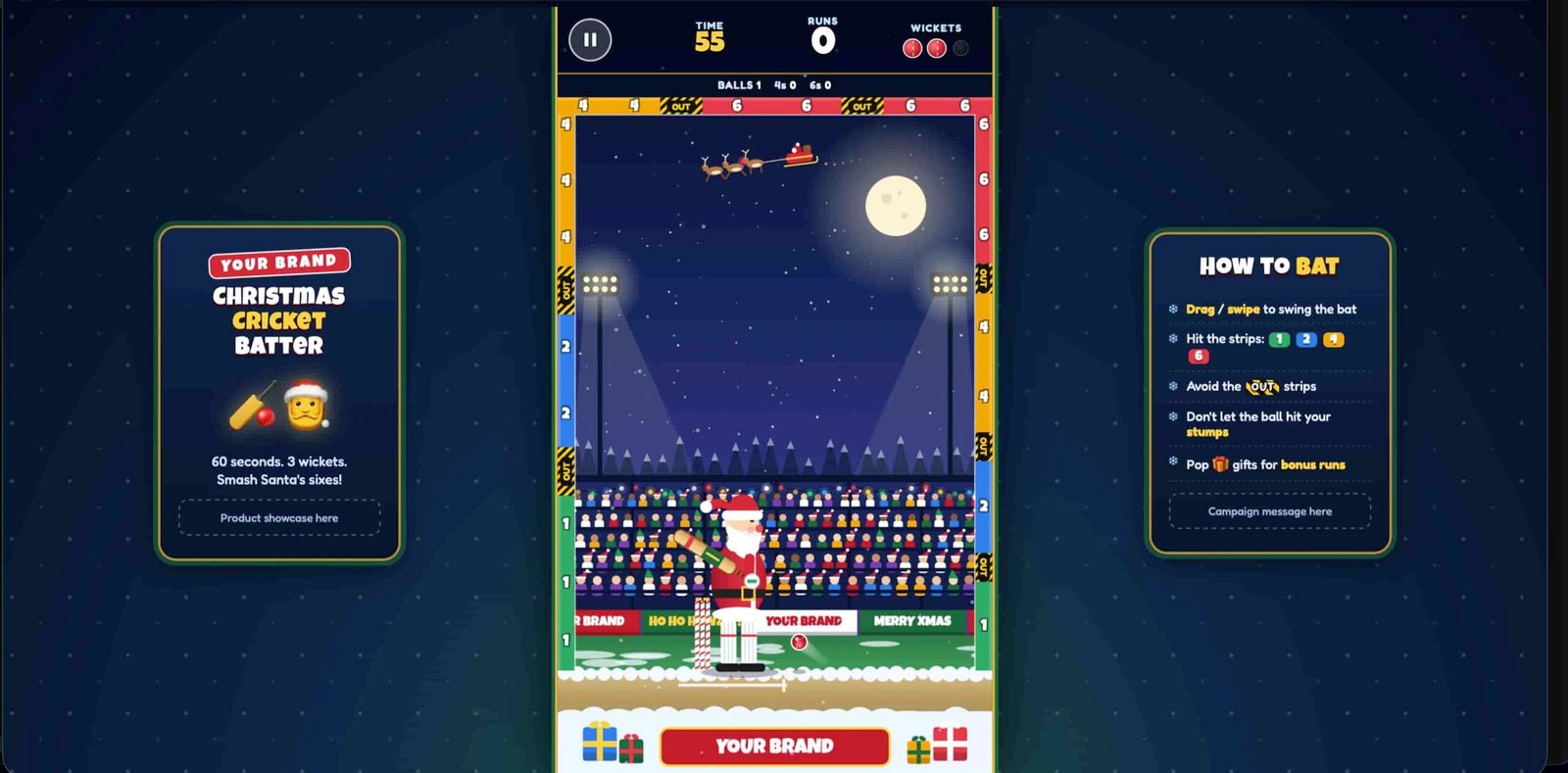
Christmas Cricket Batter is a branded browser game where Santa is the batter. Players drag or swipe to swing, hit the ball into scoring strips marked 1, 2, 4 and 6, and try to score as many runs as they can in 60 seconds without losing three wickets.

  • One drag or swipe to swing, with a short practice round for first-time players
  • 60 seconds and three wickets per innings, so the next player steps up fast
  • Plays in a phone or desktop browser, nothing to install

Gameplay clip. It starts muted, so use the video controls for sound.

What is Christmas Cricket Batter?

Christmas Cricket Batter is a 2D arcade cricket game that runs in the browser. Santa stands at the crease in a Christmas stadium at night, and balls come at him one at a time from the right. The player drags or swipes to swing his bat, and the ball flies off toward the edges of the screen.

The edges are the scoreboard. Strips line the left, top and right walls, marked 1, 2, 4 and 6, and a struck ball that touches one scores those runs. Black and yellow OUT strips sit between them, and a ball that touches one costs a wicket. So does a missed ball that hits the candy-cane stumps.

An innings is one continuous 60 seconds with three wickets. It ends when the clock reaches zero or the third wicket falls, and the result screen then shows total runs, fours, sixes, balls faced, outs and bonus runs.

It's built for a portrait phone screen. On a computer, the game sits in the middle of a snowy stadium-night background, and when the window is wide enough, two side panels appear: a product showcase box on the left and a campaign message box on the right.

How runs work

  • Struck ball touches a 1 strip+1
  • Struck ball touches a 2 strip+2
  • Struck ball touches a 4 strip+4
  • Struck ball touches a 6 strip+6
  • Struck ball passes through the bonus gift+2
  • Wicket lost: a struck ball touches an OUT strip, or a missed ball hits the stumpsOUT

Only a struck ball scores from a strip. A missed ball never does, and a struck ball that settles on the ground is a dot ball.

Why a branded cricket game works at events

The swing takes one gesture to learn, and every shot is a small bet between a bigger score and a lost wicket.

One swipe to learn

Drag or swipe anywhere on the playfield and the bat swings from Santa's gloves toward your finger. First-time players also get a short practice round, with a ghost hand that shows the swing, then how to hit, how to go big and what to avoid. It can be skipped, and the browser remembers it was done.

Swing height decides the score

A ball met as the bat sweeps upward is lofted toward the 4 and 6 strips. Flat, early contact drives it low into the 1 and 2 strips, and a still bat just blocks. On the right wall the 6 sits at the top and the 4, 2 and 1 sit lower, with an OUT strip between each pair.

The clock raises the pressure

Balls start at 400 to 470 pixels per second and reach 610 to 720 in the last 15 seconds, on a game screen 720 pixels wide. The gap between balls shrinks from 0.95 to 0.55 seconds. In the final 10 seconds the timer turns red, a tick sounds each second and the music speeds up.

A bonus gift worth the risk

After 8 seconds, a floating gift box with a +2 tag can appear in the upper playfield. A struck ball that passes through it earns 2 bonus runs and keeps flying, and the box disappears after 3 deliveries if nobody hits it. It's built as an optional brand target, and bonus runs show separately on the result screen.

How to play in three steps

  1. Watch the red arrow

    Balls come from the right, one at a time. A pulsing red arrow on the right edge shows the release height just before each ball arrives.

  2. Drag to swing

    Press and drag with a mouse, or swipe on a phone. The bat points from Santa's gloves toward your pointer. A natural swing sweeps from the upper left, down past his feet and up to the right.

  3. Score runs, avoid OUT

    A ball that touches a 1, 2, 4 or 6 strip scores those runs. OUT strips and the stumps cost a wicket. The innings ends after 60 seconds or three wickets.

Want to see it for yourself? Play the live game.

Play the game

Make it yours: your brand, your message, your difficulty

The game works as it is. Send your logo, brand colors and campaign message, and we'll share a proof for you to approve before anything goes live.

Your brand around the stadium

Placeholder brand tags sit on the menu, the sponsor boards, the bottom board, the computer side panels and the thank-you line on the result screen. Your brand name takes their place.

Your product and message

On a computer, the left side panel has a product showcase box and the right panel has a box for your campaign message, next to a short how-to-bat summary.

Your look and difficulty

The bat sticker, strip colors, batter, ball and gift box are all points we can restyle, and every tuning value sits in one settings block. Make it gentler for a casual crowd or tougher for a competitive one.

Specs at a glance

What you get with the branded cricket game.

Controls
Drag the mouse on a computer, or touch and drag or swipe on a phone. Release and the bat eases back to the backlift. The pause button, Esc or P pauses, and the game also pauses when the browser tab is hidden. Pause offers resume, restart and main menu.
Where it runs
Phone and desktop browsers, nothing to install. The game screen is portrait, 720 by 1280 pixels, and scales to fit every device. On a computer it sits in the middle with a snowy stadium-night background.
Innings length
One continuous 60-second innings with three wickets and no levels. It ends when the clock reaches zero or the third wicket falls.
Deliveries
Balls come one at a time from the right. They are length, full or short balls, and full tosses join from 15 seconds. Each ball is test-played with the game's own physics first, and only balls the bat can reach are bowled.
Difficulty
Ball speed per 15-second band, in pixels per second on the 720-pixel-wide screen: 400 to 470, 460 to 560, 540 to 640, then 610 to 720, capped at 740. The gap between balls goes from 0.95 to 0.55 seconds.
Scoring strips
Strips on the left, top and right walls score 1, 2, 4 or 6, in green, blue, gold and red. OUT strips use black and yellow stripes. Where strips meet at a corner, the top wins, then the left, then the right.
Outcomes
Each ball ends in exactly one result: runs, an OUT, a bowled wicket or a dot ball. A missed ball that passes the stumps is a dot ball, and a struck ball can no longer be bowled.
Bonus gift
After 8 seconds, each ball has a 30% chance to bring a floating gift box worth +2 bonus runs, if none is on screen. It disappears after 3 deliveries if it is not hit.
Form and leaderboard
After the innings, players can enter a name of up to 16 characters, an email and a consent tick, or skip. The board ranks by total runs, shows the top 8 and highlights the player's row. In this demo it is saved in the browser and starts with 6 sample entries.
Sound
Original music and effects made in the browser, so there are no sound files to load. The music speeds up from 146 to 166 beats per minute in the last 10 seconds. One button turns music, crowd sound and effects off together, and the choice is remembered.
Where a branded cricket game fits best

A 60-second innings, a swipe to swing and a Christmas stadium suit a few specific situations.

  • Holiday trade show booths

    An innings ends at 60 seconds or on the third wicket, so the next visitor gets a turn quickly. The practice round shows first-time players how to swing, so your team can talk instead of explaining the rules. See more promotional games.

  • Office and client Christmas parties

    Guests swing with a finger or a mouse, and the board ranks players by total runs. In the demo, scores stay in each browser, so tell us if you want one shared board for the whole party. See more office Christmas party games.

  • Holiday campaigns that collect entries

    After the innings, a scorecard form asks for a name, an email and a consent tick, and players can skip it. In the demo, entries stay in the browser, so tell us where they should go in your quote request. See our event lead generation games.

Play Christmas Cricket Batter now

This is the live game. Swing at a few balls, hit a strip or two and see how it feels before you ask for a quote.

On a phone, Play opens the game in its own full window so it fills your screen. The first time you play, a short practice round shows how to swing. Your best score is saved on this device.

Christmas Cricket Batter: your questions answered

How does an innings end?

An innings ends when the 60-second clock reaches zero or the third wicket falls, whichever comes first. A wicket is lost when a struck ball touches an OUT strip or when a missed ball hits the stumps. At zero, no new balls are bowled and the bat locks. A struck ball already in the air can still finish and score for up to 3 seconds, while a ball that was not struck is voided. If the third wicket falls first, the innings ends at once. A TIME UP or ALL OUT banner shows, then the result screen.

Does it have a leaderboard or a sign-up form?

Yes, both, and they come after the innings, never before play. The result screen leads to a short Official Scorecard form asking for a name, an email and a consent tick, and players can skip it. The Top Batters leaderboard then ranks players by total runs and shows their balls faced, with the top 8 listed and the player's own row highlighted. In this demo the board is stored in the browser and starts with 6 sample entries, so a real campaign needs it connected to your own backend, and you supply the consent wording. Tell us where entries should go when you request a quote.

How hard does it get?

Ball speed climbs in four 15-second bands, measured on a game screen 720 pixels wide: 400 to 470 pixels per second at the start, then 460 to 560, 540 to 640 and finally 610 to 720, with a hard cap of 740. The gap between balls shrinks from 0.95 to 0.55 seconds, and full tosses join the mix from 15 seconds. Every ball is test-played with the game's own physics before it is bowled, and only balls the bat can reach are used, so no delivery is impossible. In the last 10 seconds the timer turns red and the music speeds up from 146 to 166 beats per minute.

Can we change the look, the message and the difficulty?

Yes. The brand tags, campaign message boxes, bat sticker colors, strip colors, batter, ball and gift box are all points we can restyle, and every tuning value lives in one settings block in the game, so ball speeds and the gaps between balls can be adjusted. Tell us about your crowd and how long each player should stay at the screen when you request a quote, and we'll confirm what can change.

Get a quote for your branded games

Tell us about your event, your audience and your budget. We'll come back with games that fit.

  • Share your event date so we can plan the timeline.
  • Give us a budget range and we'll work within it.
  • Send your logo when we reply, then approve a proof.