Christmas Tower Stack Builder: a branded one-tap stacking game

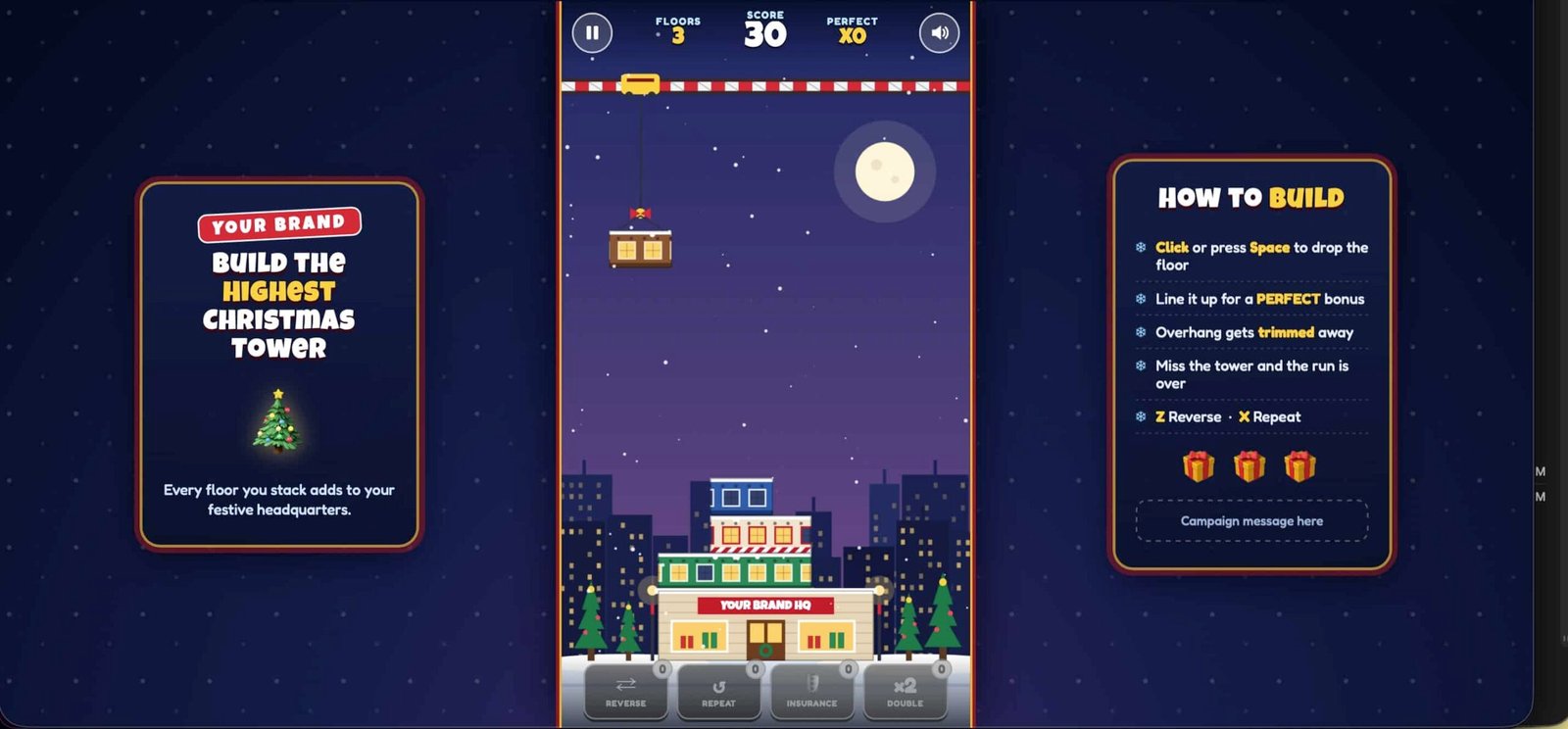
Christmas Tower Stack Builder is a branded browser game where players tap to drop floors from a swinging crane and stack them into the tallest Christmas tower they can, standing on your brand's HQ.

  • One tap to drop each floor, anywhere on the game screen
  • Your brand name on the HQ building at the base of every tower
  • Plays in a phone or desktop browser, nothing to install

Gameplay clip. It starts muted, so use the video controls for sound.

What is Christmas Tower Stack Builder?

Christmas Tower Stack Builder is an endless stacking game that runs in the browser. A crane on a candy-cane rail swings a floor from side to side above a snowy street. The player taps to let go, and the floor drops straight down onto the tower below.

Whatever hangs over the edge is trimmed off and falls away, so every miss makes the next landing narrower. Line a floor up almost dead center and it snaps into place with nothing lost, and the string lights on that floor switch on. A floor that barely touches the tower falls, and the run ends.

The tower changes as it climbs. Floors cycle through six Christmas buildings: a Gift Shop, Toy Workshop, Candy Office, Elf HQ, Cocoa Cafe and Snow Lab. Every tenth floor becomes a gold billboard that reads 10 FLOORS, 20 FLOORS and so on, and the sky fades from purple dusk to a starry night.

The whole tower stands on a building signed Your Brand HQ, which is the placeholder for your name. It's built for a portrait phone screen. On a computer, the game sits in the middle with snowy side panels, and the right-hand panel has a box for your campaign message.
How points work

  • Each floor placed+10
  • Good placement bonus+5
  • Perfect placement bonus+25
  • Extra for each Perfect in a row after the first, up to +100+10
  • Every 10th floor milestone+100

Double Points doubles a floor's score, but not the milestone bonus. Once a floor falls, no more score can be gained.

Why a branded stacking game works at events

The rules take one tap to learn, and every floor asks for a sharper eye than the last.

One tap, one decision

Tap anywhere on the game screen to drop a floor. The only thing a player has to judge is when, so there's little to explain at a busy booth. Tapping a power-up button never drops the floor by accident.

Every miss narrows the tower

Trimmed overhang is gone for good, so a sloppy floor makes the next landing harder. Accuracy wins it back: from the third Perfect in a row, each Perfect regrows the floor by 14 pixels, up to its starting width.

A gift every five floors

At floors 5, 10, 15 and on, players unwrap a power-up: Reverse flips the swing, Repeat undoes the last placement, Insurance absorbs one failed drop and Double Points doubles the next five floors.

Speed that keeps climbing

The crane starts at 250 pixels per second and gains 9 with every floor placed. It reaches 520 by floor 30 and tops out at 640. From floor 35 the swing gets wider too.

How to play in three steps

  1. Watch the floor swing

    A crane carries a floor from side to side along the rail. Each new floor starts on the opposite side from the last one.

  2. Tap to drop it

    Tap anywhere on the game screen. On a computer, click, or press Space, Enter or the Down arrow. The floor falls straight down.

  3. Line it up and build higher

    A near-perfect drop snaps into place and lights up. Anything hanging over is trimmed. Keep stacking until a floor falls.

Want to see it for yourself? Play the live game.

Play the game

Make it yours: your brand, your message, your difficulty

The game works as it is. Send your logo, brand colors and campaign message, and we'll share a proof for you to approve before anything goes live.

Your brand on the HQ

Every tower stands on a building signed with your brand name. The menu tag, the desktop side panels and the thank-you line on the result screen carry it too.

Your campaign message

The menu, the right-hand side panel on a computer and the result screen each have a box for your campaign copy and call to action.

Your floors and difficulty

Floor names and colors, power-up names, swing speeds, points and how often gifts arrive are settings in the game. Make it gentler for a casual crowd or tougher for a competitive one.

Specs at a glance

What you get with the branded stacking game.

Controls
Tap anywhere on the game screen to drop a floor. On a computer, click, or press Space, Enter or the Down arrow. Reverse and Repeat have buttons, and Z and X work as keys. P or Esc pauses, and M turns sound on and off.
Where it runs
Phone and desktop browsers, nothing to install. The game screen is portrait on every device and scales to fit. On a computer it sits in the middle with snowy side panels when there's room for them.
Run length
Endless. There are no levels and no timer, and a run ends when a floor falls.
Placement
Within 7 pixels of the floor below is Perfect: it snaps into place and loses no width. Otherwise the overhang is trimmed. Keeping at least 85% of the width is Good, and less is Risky. Under 16 pixels of overlap and the floor falls.
Difficulty
Swing speed starts at 250 pixels per second, gains 9 for each floor placed and is capped at 640. The swing widens from floor 35. A floor's speed is fixed when it appears and never changes mid-swing.
Scoring
+10 per floor, +5 for Good and +25 for Perfect. A streak of Perfects adds +10 for each one after the first, up to +100, and every 10th floor is worth +100.
Power-ups
A gift every 5 floors, picked at random from the power-ups that aren't full: Reverse (hold up to 3), Repeat (up to 2), Insurance (1) and Double Points (the next five floors score double). If all are full, the gift is +50 points.
Form and leaderboard
After a run, players can enter a name, an email and a consent tick, or skip. The Tallest Towers board shows the top eight by score. In this demo the board and the best score are saved in the browser, and entries aren't sent anywhere.
Sound
Original music and effects made in the browser, so there are no sound files to load. One button turns music and effects off together, and the choice is remembered.
Pause
A pause button, plus an automatic pause when the browser tab is hidden. The pause screen offers resume, restart and back to the menu.

Where a branded stacking game fits best

A one-tap drop and a growing Christmas tower make it a fit for a few specific situations.

  • Holiday trade show booths

    Anyone can start with one tap, and a run ends when a floor falls, so the next visitor gets a turn. The tower grows on screen floor by floor, so people nearby can follow a run.

  • Office and client Christmas parties

    There are no levels or timers to explain, and the leaderboard ranks by score, so a tall but sloppy tower doesn't win. See more office Christmas party games.

  • Holiday campaigns that collect entries

    After a run, an optional form asks for a name and email with a consent tick. In the demo, entries stay in the browser, so tell us where they should go in your quote request. See our event lead generation games.

Play Christmas Tower Stack Builder now

This is the live game. Time your drops, build a few floors and see how it feels before you ask for a quote.

On a phone, Play opens the game in its own full window so it fills your screen. Your best score is saved on this device.

Christmas Tower Stack Builder: your questions answered

How does a run end?

A run ends when a dropped floor lands with almost nothing under it. Any floor with enough overlap stays, and the overhang is trimmed off and falls away. A floor that overlaps the tower by less than 16 pixels, on a game screen 720 pixels wide, tips off the edge and the run is over, unless the player holds an Insurance gift, which absorbs one failed drop. There is no timer, so a run lasts until a floor falls.

Does it have a leaderboard or a sign-up form?

Yes, both, and they come after the run, never before play. The result screen leads to a short form asking for a name, an email and a consent tick, and players can skip it. The Tallest Towers leaderboard then shows the top eight by score, with floors built as the second stat. In this demo the board is stored in the browser and starts with sample names, so a real campaign needs it connected to your own backend. Tell us where entries should go when you request a quote.

How hard does it get?

The crane swings the first floor at 250 pixels per second and gains 9 for every floor placed. That is 340 at floor 10, 430 at floor 20 and 520 at floor 30, topping out at 640 from about floor 43. From floor 35 the swing also gets wider. Every trimmed floor narrows the landing surface, so players have to win width back with accurate drops: from the third Perfect in a row, each Perfect regrows the floor by 14 pixels, up to its starting width.

Can we change the difficulty, scoring and look for our event?

Yes. Swing speeds, placement tolerances, points, how often gifts appear and the limit on each gift are all settings in the game, so they can be adjusted. The floor names and colors, the brand name on the HQ building and menu, the campaign copy and the power-up names can be changed too. Tell us about your crowd and how long each player should stay at the screen when you request a quote, and we'll confirm what can change.

Get a quote for your branded games

Tell us about your event, your audience and your budget. We'll come back with games that fit.

  • Share your event date so we can plan the timeline.
  • Give us a budget range and we'll work within it.
  • Send your logo when we reply, then approve a proof.

Christmas Tower Stack Builder: your questions answered

How does a run end?

A run ends when a dropped floor lands with almost nothing under it. Any floor with enough overlap stays, and the overhang is trimmed off and falls away. A floor that overlaps the tower by less than 16 pixels, on a game screen 720 pixels wide, tips off the edge and the run is over, unless the player holds an Insurance gift, which absorbs one failed drop. There is no timer, so a run lasts until a floor falls.

Does it have a leaderboard or a sign-up form?

Yes, both, and they come after the run, never before play. The result screen leads to a short form asking for a name, an email and a consent tick, and players can skip it. The Tallest Towers leaderboard then shows the top eight by score, with floors built as the second stat. In this demo the board is stored in the browser and starts with sample names, so a real campaign needs it connected to your own backend. Tell us where entries should go when you request a quote.

How hard does it get?

The crane swings the first floor at 250 pixels per second and gains 9 for every floor placed. That is 340 at floor 10, 430 at floor 20 and 520 at floor 30, topping out at 640 from about floor 43. From floor 35 the swing also gets wider. Every trimmed floor narrows the landing surface, so players have to win width back with accurate drops: from the third Perfect in a row, each Perfect regrows the floor by 14 pixels, up to its starting width.

Can we change the difficulty, scoring and look for our event?

Yes. Swing speeds, placement tolerances, points, how often gifts appear and the limit on each gift are all settings in the game, so they can be adjusted. The floor names and colors, the brand name on the HQ building and menu, the campaign copy and the power-up names can be changed too. Tell us about your crowd and how long each player should stay at the screen when you request a quote, and we'll confirm what can change.